Taskaid and Notion: Tasks and Context Across Agents
Notion now lets the assistants you use, such as ChatGPT and Claude, save what they learn into one memory in your Notion workspace. A decision you explain in one conversation is saved, and another connected assistant can look it up when you ask.
Memory doesn't cover the other half of a conversation: the things you said you'd do, and by when. A memory comes back when someone asks for it. A commitment has to come back on its day, whether anyone asks or not.
We connected both and used them together. This is how we split the work between them.
What Notion added
Assistants reach Notion through Notion MCP, the same way they reach Taskaid's MCP server. Since Notion's October update, an assistant connected to Notion can save to your personal memory and read it back later, from any assistant connected to the same Notion account and workspace.
The memory is ordinary Notion: a Memories database with one page per topic, and an About page that sums it up. You can read, edit or remove any of it. An assistant connected this way saves when you ask it to remember something, and Notion shows which assistant saved each memory.
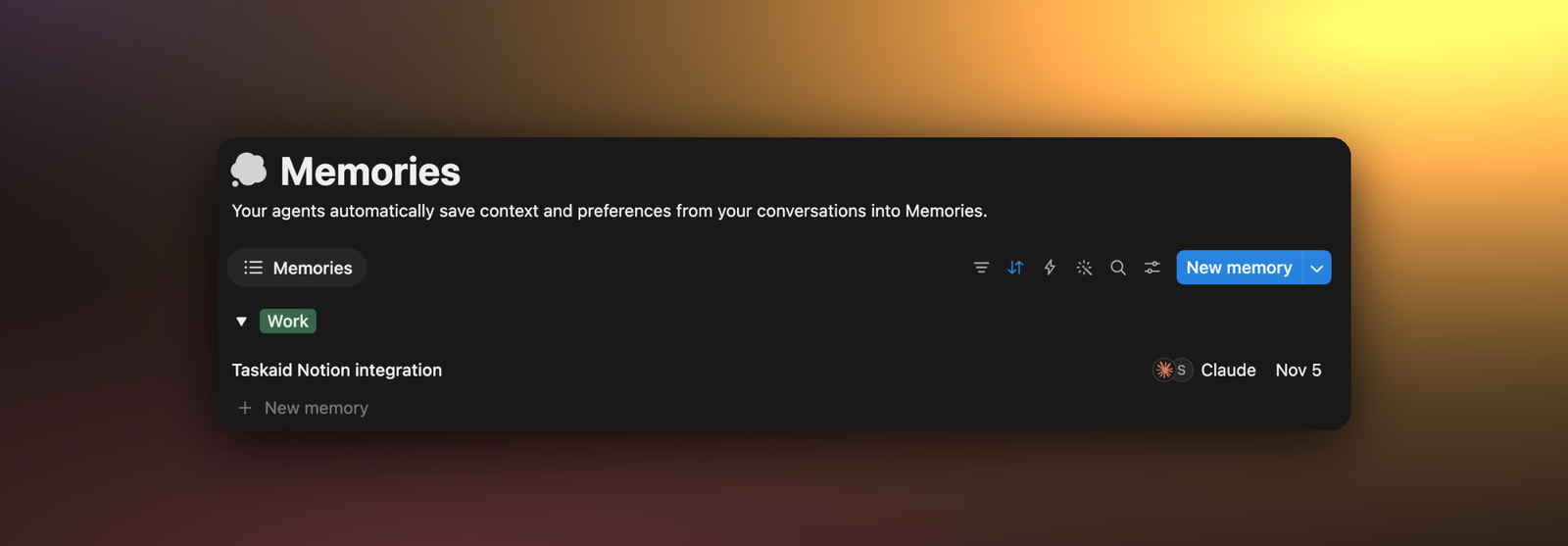
Context in Notion, tasks in Taskaid
Memory is for what stays true: a decision and its reason, how you like a report written, who owns what. It's context, and it does its job when an assistant looks it up.
A commitment works differently. "Send the pricing page to Priya by Friday" matters on Friday, and only if something brings it up. It needs a day, a place in that day's plan, and a way to be marked done. That's what Taskaid holds: tasks with a day, a note for the context, and a daily plan, the same in every assistant you connect. On the day, the task is in Today, in Taskaid's morning email if you get it, and in any assistant you ask what's on. A reminder can add a time, and an assistant can act on it when it comes.
A rule of thumb that worked for us: if it has a "by when", it's a task. The reason behind it is a memory.
| Notion memory | Taskaid |
|---|---|
| We chose a custom MCP connection, and why | Share the guide on Tuesday |
| Prefers short status updates | Send the weekly update on Friday |
| Priya owns the pricing page | Ask Priya for the final numbers tomorrow |
Keep the decision and its reason in Notion, and the task's day and whether it's done in Taskaid, so any assistant reads the current state after you move or finish it.
Using both across two assistants
We tried it on our own work. In one Claude conversation, we asked it to remember a decision about Taskaid's Notion integration: it connects as a custom MCP connection, it worked on Notion's Free plan, and prompts in Notion should name Taskaid. In the same conversation, we added the next step to Taskaid: share the guide on X and LinkedIn on Tuesday.
Claude saved the decision to Notion and the task to Taskaid. Later, in a different assistant, Notion's own agent, we asked: "What did I decide about the Notion integration, and when am I sharing the guide in Taskaid?"
It searched the memory, then Taskaid, and answered from both: the decision, linked to its memory page, then the day the guide is due to be shared, from the task.
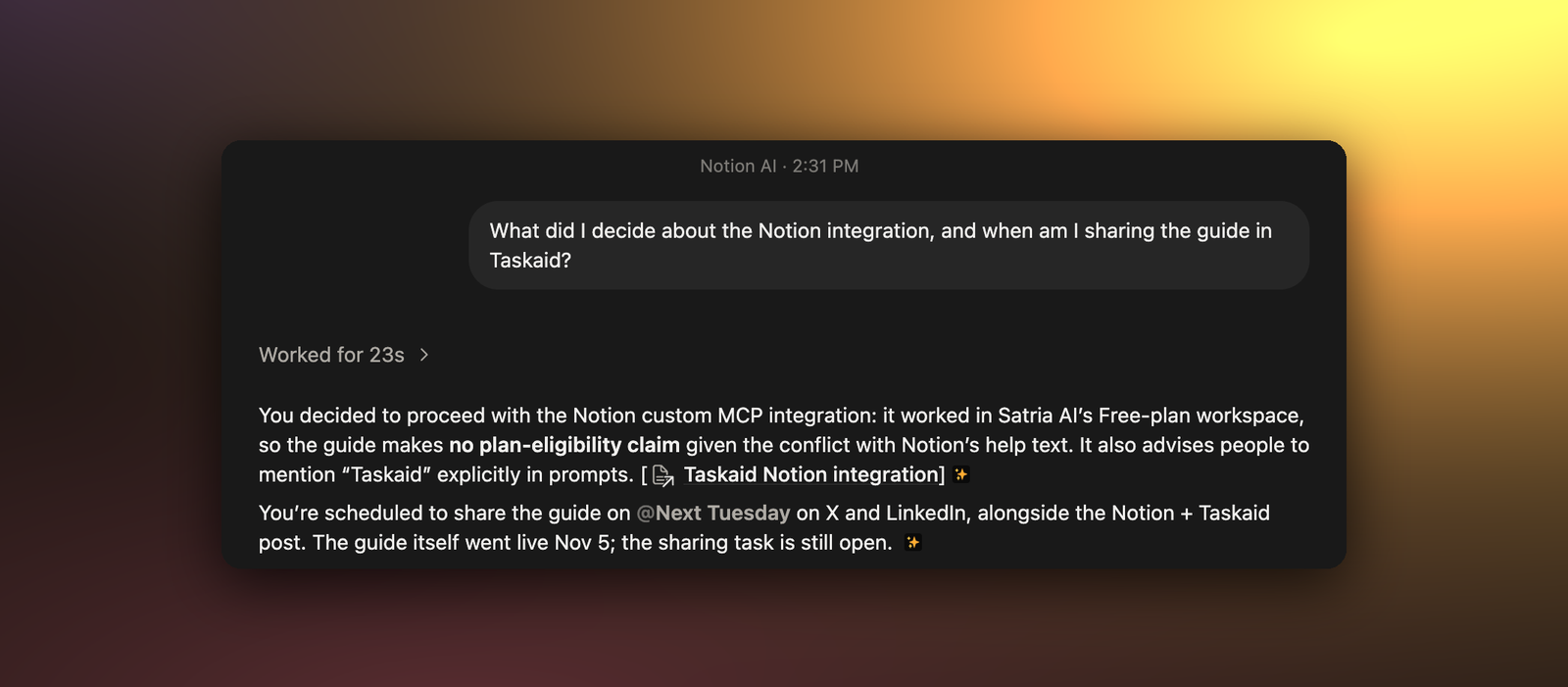
Notion's agent never saw the Claude conversation. The memory and the task carried what mattered from it. When the work itself moves between assistants, a task's note can carry the working context too: When AI Assistants Work on the Same Task covers how, and Handoff shows it end to end.
Using Taskaid from Notion Agent
Notion's agent can use Taskaid directly, which is how its answer reached our tasks. In Notion, open Settings → Connections, select Add connection → Custom MCP connection, paste https://taskaid.ai/mcp, and sign in to Taskaid. A workspace admin has to allow custom MCP servers first. It worked in our workspace on Notion's Free plan.
Two things we learned:
- Name Taskaid in what you ask. Notion has tasks of its own. Without the name, it may look there instead, or search Taskaid too narrowly and find nothing.
- Check the approval setting. Notion Agent starts Taskaid's write tools on Review for me, which asks only about actions it judges unsafe, so adding a task usually goes ahead without asking. Switch it to Always ask to approve each change.
The Notion guide has every step.
Setting up both
- Notion memory: connect Notion to your assistant with Notion's guide, then ask it to remember something. Notion creates the Memories database with the first save.
- Taskaid: Integrations has a guide for each assistant, such as ChatGPT or Claude. Connecting an assistant is free.
To try it, connect two assistants to the same Notion account and workspace, and both to Taskaid. In the first, ask:
Save this to my Notion memory: we chose the annual plan because of the discount. Then add a Taskaid task, "Tell the team about the annual plan", for Friday.
Then, in a new conversation with the other assistant:
Why did we choose the annual plan, and when am I telling the team? Check my Notion memory and Taskaid.
If the answer gives the reason and Friday, both are working. Assistants has more to try.